Info: Starting in June 2025, Index is pausing support for the Protected Audience API. After this date, you will no longer receive Protected Audience API demand from Index, even if your inventory is configured to be eligible for it.
Before you begin: You must be using Google Ad Manager as your Media Owners's ad server A platform that manages, stores, and delivers advertisements to a publisher's site..
To receive Protected Audience API auction demand, complete the following steps:
- In Google Ad Manager, click Admin, then Global settings, and under Ad preference settings, make sure that the following settings are enabled:
- Protected Audience API
- Allow testing on up to 100% of my inventory with non-Google sellers, regardless of performance impact
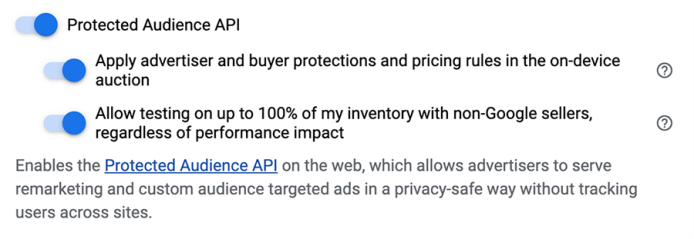
For more information about these settings, see Google’s documentation on Protected Audience API and Ad Manager.
-
Build the following modules in your Prebid.js An open-source library for media owners to implement header bidding on their websites and manage multiple header bidding partners. configuration:
- PAAPI module: Add this module by adding
paapito the list of modules that you are already using. For more information about how to add the module, see Prebid’s PAAPI module documentation. - Fledge for GPT Google Publisher Tag (GPT). An ad tagging library for Google Ad Manager (GAM) which is used to dynamically build ad requests. It takes key details from a publisher, such as ad unit code, ad size, and custom targeting, builds the request, and displays the ad on web pages. module: Add this module by adding
fledgeForGptto the list of modules that you are already using.Note: The
fledgeForGptmodule documentation no longer exists on Prebid's site. You can however refer to Prebid's Protected Audience API (PAAPI) for GPT Module documentation for information on adding module configurations.
- PAAPI module: Add this module by adding
Configure your ad units to make them eligible for Protected Audience API demand. You can do this in the global-level, bidder level, or ad-unit level configuration. However, Index recommends that you do this in the global-level configuration by setting the
defaultForSlotsparameter to1.pbjs.que.push(function() { pbjs.setConfig({ paapi: { enabled: true, defaultForSlots: 1 } }); });Note: If you are using the
paapi.bidders[], make sure that you includeixto the list of bidders as follows:pbjs.que.push(function() { pbjs.setConfig({ paapi: { enabled: true, bidders: ['ix', /* any other bidders */], defaultForSlots: 1 } }); });For examples on bid requests and responses that include the Protected Audience API fields, see Examples of OpenRTB bid requests and responses.
