Before you begin: Complete Validating and deploying a container for the first time. This topic covers the naming convention, deployment notifications, and monitoring you'll use every time you deploy, not just during onboarding.
Deploying your image and model
Deploying your image and model is intended to be simple. Naming your artifact correctly and uploading it is the whole interface.
Your image tag and your S3 model folder name must both follow the naming convention described in Artifact naming conventions and deployment regions. The same convention applies to both artifact types. That page covers the version format, the optional annotation, and the optional region suffix (_AMS, _EMEA, _APAC) that controls which region or regions an artifact deploys to.
Not eligible yet? Before your first push, run through Checklist: What must pass before a container can auto-deploy. Naming, vulnerability scan, and required endpoints all need to pass before an image is eligible to auto-deploy.
Images and models deploy together. A single sync deploys an image and its model together. They are coupled at rollout time. If you update only your image, your current model still gets redeployed alongside it, and vice versa.
Global deployments overwrite region-specific deployments. A global upload overwrites every region, including one which could be running a region-specific artifact. It is recommended that all artifacts stick to being either global or region-specific to avoid unintended overwrites.
Monitoring your deployment
You can follow your deployment's journey through Index Cloud in Grafana in the Index Managed folder in the Deployment Tracker dashboard, which visualizes logs recorded as your change is processed by Index. For details on how to access Grafana, see Access your Grafana data.
"Rolled out" means a release was applied to a datacenter. It confirms the rollout was accepted there. It is not a health signal. Check your application metrics for health status.
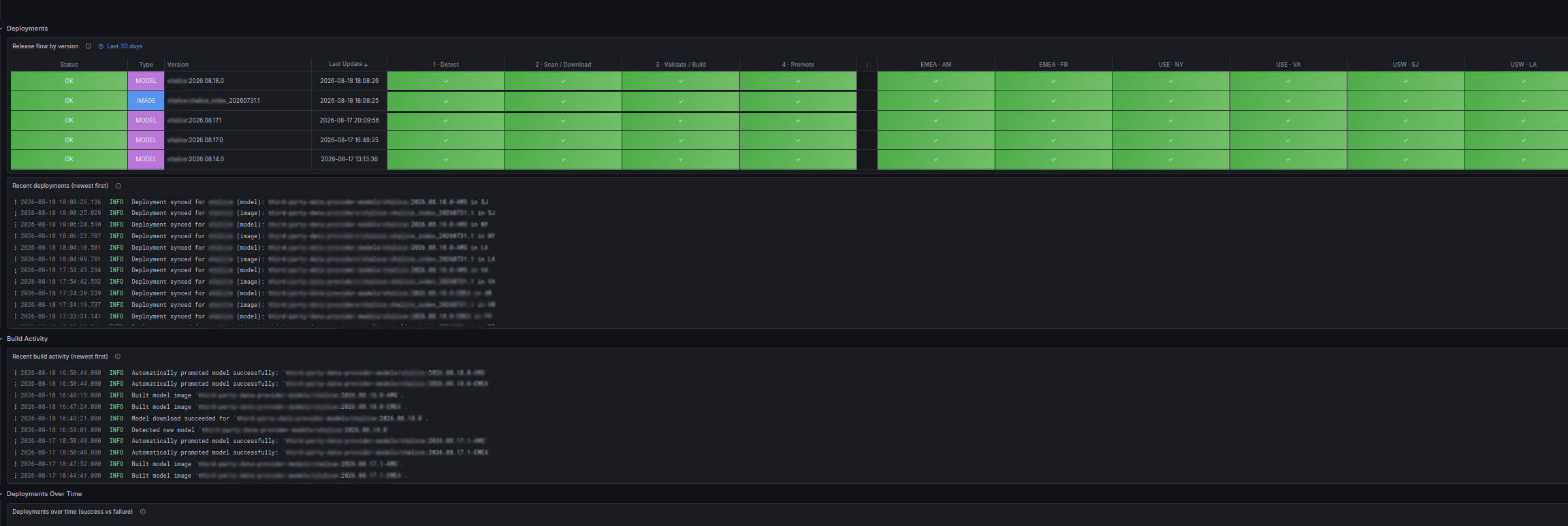
The visualization shows the overall status of a deployment, whether something has gone wrong, and where it's at in the deployment process.
The following shows a successful rollout. Index's checking extends up through the datacenter rollout itself. Once your service starts in production, Index confirms its health check and readiness endpoints report healthy. See the Orchestration endpoints section in Building a Docker container. Once every targeted datacenter box goes green, as shown in the example below, the deployment is complete and successful from Index's side. Index has not changed anything infrastructure-side during the rollout, so if a datacenter box shows red after Promote, it is very likely something in your own change rather than an issue on the Index-side.
From that point on, you're in the realm of monitoring, not deployment. It's up to you to monitor your own health, logs, and metrics and decide whether your change is behaving the way you want. Index does not make that call for you. See Access your Grafana data for how to set that up.
The following shows a rollout that failed during the Validate/Build phase.

Notifications and alerting
Index provides optional deployment lifecycle notifications to a shared Slack channel, #partner-index-external-notifications. These are push-notification supplements to the monitoring available in Grafana. Grafana remains the source of truth if a message is missed or its wording changes.
The exact format and wording of these messages may change over time.
Image notifications
| Notification | What you'll see | What you need to do |
|---|---|---|
Image Detected |
| No action needed. Confirms Index has detected your newly pushed image and is starting the deployment pipeline. SDLC logs and visualizations for this pipeline are available in Grafana under Dashboards > Index Managed. |
Deployment Requirement Check Performed |
| Success: none. Failure: components within your image require updating or change. A list of these components is logged in Grafana. Contact your Index Representative if you believe this is a false positive. |
Test Validation Performed |
| Success: none. Failure: image failed to pass run of test tool. A log of this run has been added to Grafana. See Using the Index testing tool. |
Deployment Success |
| Expect the deployment to take effect within 5 minutes. Confirm in the Deployment Tracker dashboard that the rollout completed, and check your application metrics and logs for health afterward. Contact your Index Representative if no deployment follows. |
Deployment Partial Success |
| Deployments may be paused in specific regions to protect Index infrastructure during an incident or planned maintenance. Contact your Index Representative to be notified once deployments resume in the affected regions, if this hasn't already been communicated. |
Deployment Skipped (Frozen Regions) |
| All target regions are currently frozen from deployments, so no deployment occurred. Contact your Index Representative to be notified once deployments resume, if this hasn't already been communicated. |
Deployment Failure (Other) |
| Index-side issue with deployment. Should not occur. Contact your Index Representative. |
Model notifications
| Notification | What you'll see | What you need to do |
|---|---|---|
Model Detected |
| No action needed. Confirms Index has detected your newly pushed model and is starting the deployment pipeline. |
Model Download Pass/Fail |
| Success: no action needed. Confirms Index has downloaded your newly pushed model. Failure: confirm the model is available and has the proper permissions set. Contact your Index Representative if you believe the issue is on Index's side. |
Deployment Success |
| Your deployment will begin within 5 minutes. Confirm in the Deployment Tracker dashboard that the rollout completed, and check your application metrics and logs for health afterward. Contact your Index Representative if no deployment follows. |
Deployment Partial Success |
| Deployments may be paused in specific regions to protect Index infrastructure during an incident or planned maintenance. Contact your Index Representative to be notified once deployments resume in the affected regions, if this hasn't already been communicated. |
Deployment Skipped |
| All target regions are currently frozen from deployments, so no deployment occurred. Contact your Index Representative to be notified once deployments resume, if this hasn't already been communicated. |
Deployment Failure (Other) |
| Index-side issue with deployment. Should not occur. Contact your Index Representative. |
If a deployment doesn't behave as expected, or you have questions, reach out to your Index Representative or post in #partner-index-external.
