注意:2025年6月より、IndexはProtected Audience APIへの対応を一時的に停止します。この日以降は、在庫がProtected Audience API 対応として構成されている場合でも、IndexからProtected Audience APIデマンドを受け取ることはできません。
Before you begin: You must be using Google Ad Manager as your publisher ad server and the PAAPI for GPT Module in your Prebid.js configuration.
Protected Audience APIオークションデマンドを受け取るには、以下の手順に従ってください。
- Google Ad Managerで、Admin,をクリックし、Global settingsに行き、Ad preference settingsで以下の設定を有効にしてください。
- Protected Audience API
- パフォーマンスの影響に関わらず、Googleセラー以外の全てのインベントリでテストを有効にしてください
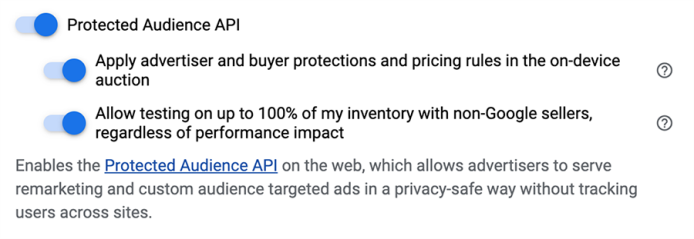
設定の詳細は、GoogleのProtected Audience API and Ad Managerをご確認ください。
paapiを既に利用しているモジュールリストに追加し、貴社のPrebid.js設定でGPTモジュールのPAAPIを構築します。モジュールの追加に関する詳細は、PrebidのProtected Audience API (PAAPI) for GPT Moduleをご確認ください。- Protected Audience APIデマンドで、貴社の広告枠が有効になるよう、以下の手順に従ってください。
pbjs.setConfig().paapiフィールドで、defaultForSlotsパラメータを1に設定し、enabledパラメータをtrueに設定してください。以下の3(b)は、この設定の例です。paapi.gpt.configWithTargetingフィールドで、configWithTargetingをtrueに設定します。PAAPIを使い、GPTスロット設定をより細かくコントロールするには、configWithTargetingをfalseに設定し、setPAAPIConfigForGPTAPIをご利用ください。以下のコードは、
defaultForSlotsとconfigWithTargeting設定の一例です:pbjs.que.push(function() { pbjs.setConfig({ paapi: { enabled: true, defaultForSlots: 1 gpt: { configWithTargeting: true }, bidders: ['ix', /* any other bidders */], }); });設定の詳細については、 PrebidのProtected Audience API (PAAPI) for GPT Module(PAAPI)をご確認ください。Protected Audience APIフィールドを含む、入札リクエストとレスポンスの例は、OpenRTB入札リクエストと入札レスポンスの例
