Billing and reporting
 What reporting is available to me as a Marketplace Data Partner?
You receive the following two reports mid-month for the previous month:
A statement showing the total amount earned from data segments at the end of the month.
A segment usage report detailing revenue by segment. A full list of reporting fields will be available soon.
The total revenue on the segment usage report will reconcile with the segment revenue listed on the financial statement.
If you're also a Marketplace Partner The owner of an Index Marketplace that curates their media solutions within the Index Marketplace and packages these offerings to bring incremental demand to media owners. For example, a Marketplace Partner could be a media agency, a data provider, or retail media network. and operate a deal-based Marketplace, you'll see a breakout of earnings from deals and segments separately.
What is the payment process for Marketplace Data Partners?You are paid according to your contractual payment terms for the amount shown in the month-end statement. If you are already earning revenue from Index Exchange (Index) as a Marketplace Partner, your segment earnings are added to your existing monthly statements. If you are solely a Data Partner, your statement only includes segment earnings. For more details on how segment fees are applied in various scenarios, see How segment fees work.
Segment management
How will Marketplace Partners find my segments on your platform? What support and infrastructure do you have to help with discoverability?When a Marketplace Partner creates a Marketplace Package deal A private auction that allows media owners to offer specific inventory directly to selected buyers identified by a deal ID. Terms are negotiated and are agreed upon before the auction occurs., they will see the segments that they have permission to use, along with any associated fees, similar to the following screenshot:
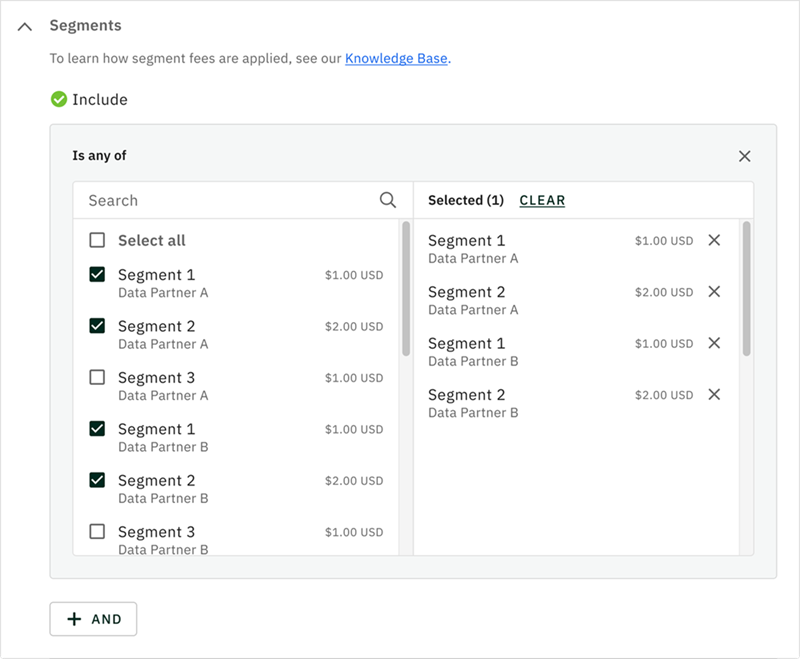
Marketplace Partners can search the list by segment name, ID, or data provider name. To help Marketplace Partners find your segments, we recommend following the naming guidelines listed in the next FAQ and adding attributes such as category and geography to improve discoverability.
Do you have guidelines for segment naming that I should follow?Preceding spaces or special characters are not allowed.
It is recommended that you follow a consistent naming pattern, where you use a the > character to break down segment hierarchies.
If data segments are onboarded through other partners or sources, use a DataSource > Type > Detail pattern. For example, DataSourceName > Demo > Female 18-24 or DataSourceName > Shopping > Purchase Intent > Auto.
If data segments are your own, you don't need to add a data source name since you are the data source, and can use a Type > Detail pattern. For example, Demo > Female 18-24 or Shopping > Purchase Intent > Auto.
How can I manage my segment data with Index?- Once you have followed the steps in Getting started as a Data Vendor, you can register your segments with Index.
- Once you have registered your segments with Index, you can view your list of segments, and edit your segments as necessary.
